
The Idea
Motivation
A while back I was going through a rough stretch, and it sparked a drive to make a change. That motivation faded quickly, though, and I soon slipped back into procrastinating.
One day whilst taking a shower, I was reflecting on why I struggled to stay productive. Why did my motivation always fade so quickly?
Then, I thought back to my university days. Even though the workload was overwhelming and the assignments were never-ending, I always managed to push through. The reason? I had a whole network of peers around me, all facing the same pressures. If I didn't keep up, I'd fall behind, and the thought of missing out on the success or progress of others kept me going. It was that underlying sense of falling behind, the sense of FOMO which became a powerful motivator.
And that's when it hit me: What if I could harness that same feeling and transform it into motivation? And just like that, the idea for the FOMO App was born.
The Concept
The FOMO App is a productivity tool that leverages the power of social accountability to ensure that you stay on track with your goals. The concept is simple: you set a few goals for yourself, everytime you complete a task, you take a picture and the task completion status along with the image gets sent to a chat with your friends.
Your friends all receive a notification when you complete a task, but the catch is that they can't see what you've done until they've completed a task themselves. This creates a sense of FOMO - the fear of missing out - and motivates your friends to complete their tasks so they can see what you've done.
Tech Stack
Frontend
The frontend of the application is developed using React Native, enabling a seamless cross-platform mobile experience. To streamline the development and build processes, Expo is employed for efficient workflow management. For state management, Redux is utilized in combination with AsyncStorage to ensure smooth data handling and persistence.
Currently, the app is undergoing Beta testing on iOS. To sign up for testing, please visit the FOMO website.
Backend (Initial Release)
For fast development, the backend is currently deployed on Firebase, utilizing Firestore for NoSQL database management and Firebase Cloud Functions for serverless computing. The authentication system is powered by Firebase Auth, ensuring secure user management and data protection. Firebase Cloud Storage is used for image storage, allowing seamless integration with the frontend. Additionally, the Expo Push Notifications API is employed to deliver real-time notifications.
Backend (Future Plans)
Firebase is a great platform for initial development, but as the user base grows, it may become necessary to migrate to a more scalable solution.
Application Preview
The application was designed to follow a minimalistic and intuitive user interface, focusing on ease of use and functionality. Below are some screenshots of the app in action.
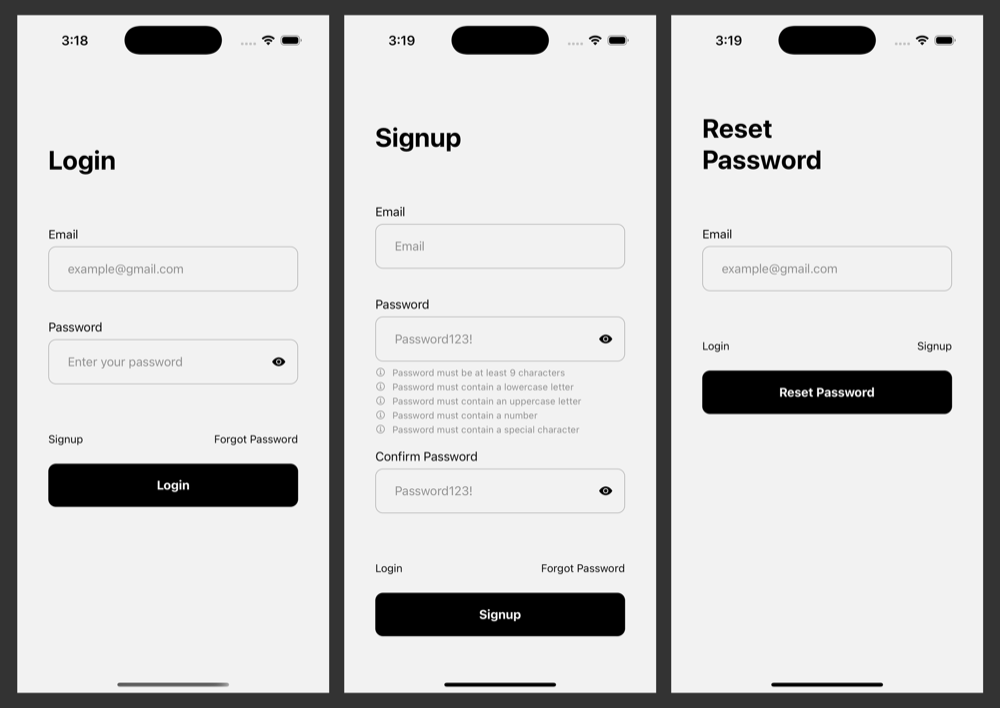
Login Flow
The Login Flow is designed to be simple and straightforward, allowing users to quickly access the app and start setting goals.
Tasks Page
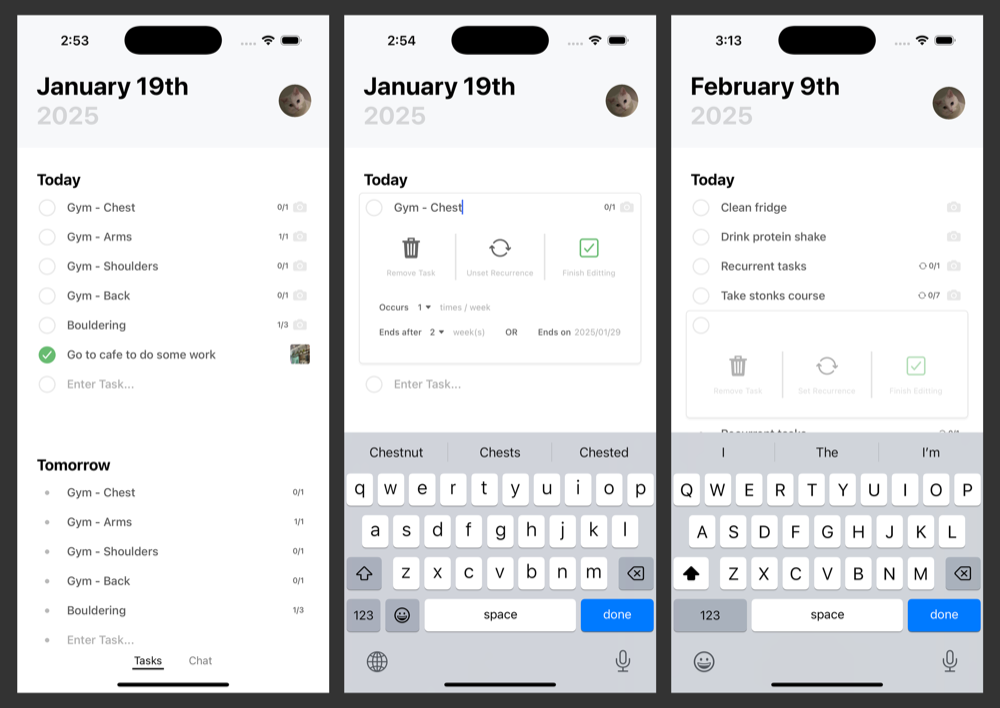
This screen is kept private to the user, where they can view their tasks for Today and Tomorrow.
The design focuses on providing a fast and intuitive experience, allowing users to quickly add tasks without being overwhelmed. If they wish to make changes or set recurrences, they can easily do so by clicking on the task itself.
There are two main types of tasks: Daily Tasks and Recurrent Tasks.
Daily Tasks must be completed within the same day they are assigned. On the other hand, Recurrent Tasks are tasks that need to be completed a certain number of times each week. These tasks reset at the start of a new week, giving you a fresh opportunity to tackle them.
Chat Page
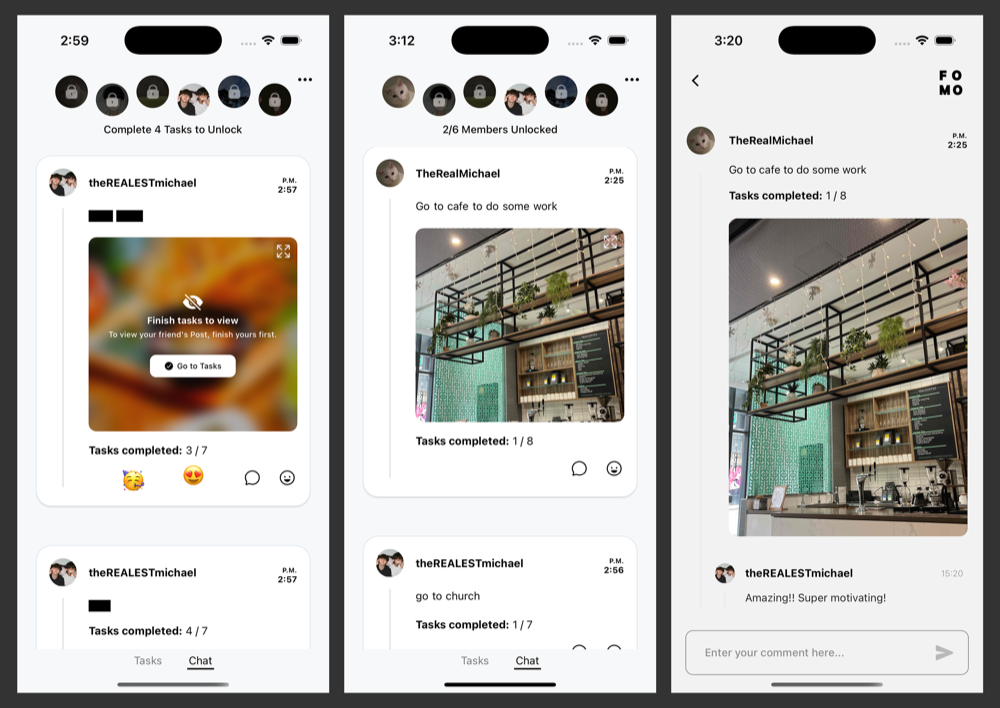
Welcome to the social side of the app, where the FOMO happens! On this page, users can see the tasks their friends have completed and the images they've shared. However, access to this content is unlocked only once they've completed a certain number of their own tasks.
Users are notified whenever a friend completes a task, triggering a sense of FOMO that motivates them to catch up and view their friends' accomplishments.
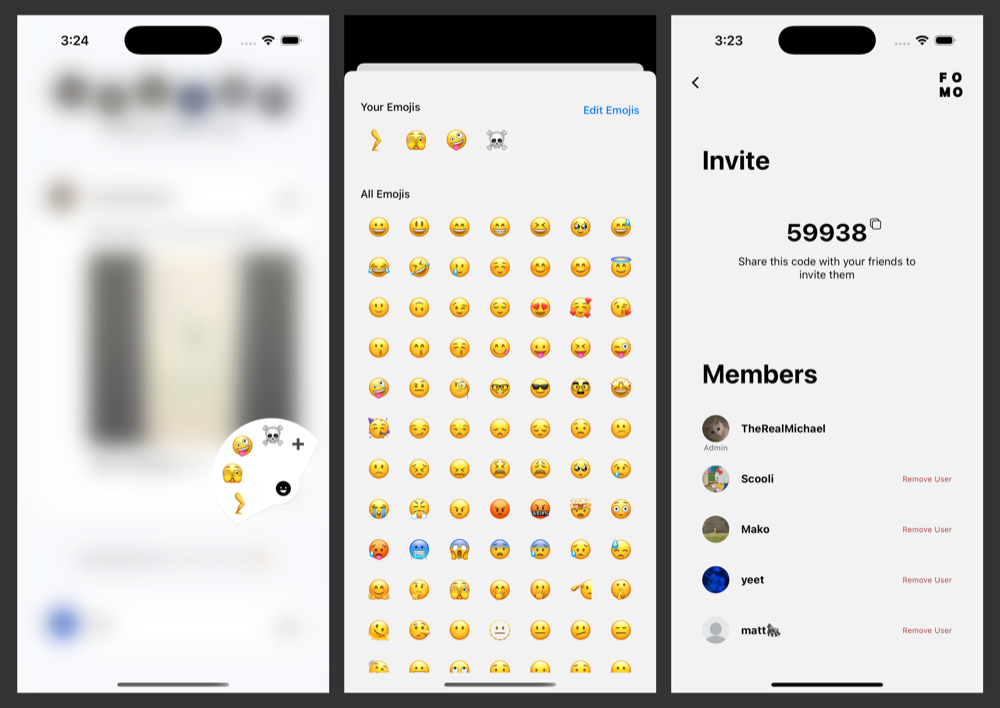
Interactive features on this page include Sending Emojis and Commenting. Users can quickly send an emoji by either double-tapping the post or by clicking the Emoji Icon in the bottom right corner, which opens an Emoji Panel. This feature allows users to easily express support or encouragement while adding to the FOMO by seeing posts with lots of emoji reactions from friends. For more options, users can customize their emojis by clicking the plus icon on the Emoji Panel.
The chats are designed to be for you and your close friends, therefore they are currently limited to have only 6 members. Users can join a chat via the chat secret code, which is a unique 5 digit code that is generated when a user creates a chat.
Next Steps
The application is currently under Beta Testing on iOS, and there are many new features that are planned to be released in the future. Some of the key features that are in the pipeline include: AI Powered Task Suggestions, Leaderboards, Customizable Themes, Task Streaks, Calendar View, and Profile Picture Generation, and more!
Stay tuned for more updates!
If you want to be a part of the Beta Testing, please visit the FOMO website.